
See how CostKits keeps your healthcare costs and paperwork in one place.
For you, or someone you're taking care of. Here's what actually happens once you sign up: no jargon, no surprises.
What brings you here?
Pick whichever is closest. Every option gets you to the same place, we'll just tailor the first step.
Take a photo (or forward the PDF) and email it to files@app.costkits.com. No account needed yet for this part.
A few moments later you'll get a reply email. Click it to sign in. That's it: your account is created, and your document is already waiting inside, organized and ready.
No separate signup, no credit card.
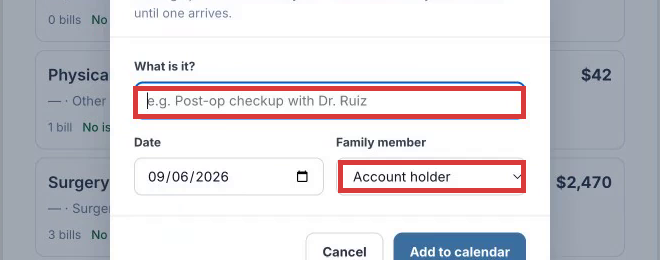
Name it, set the date, done. CostKits holds the spot on your calendar until a bill arrives.
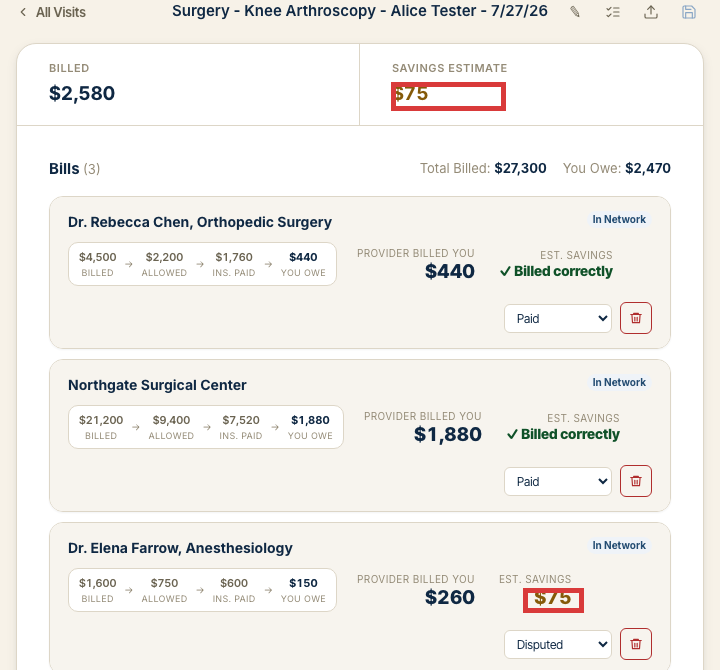
Attach it to the visit in the app, or email it to files@app.costkits.com to have it matched automatically. You'll see billed, allowed, insurance-paid, and what you actually owe, side by side.
More on how bills are groupedNo separate signup, no credit card.
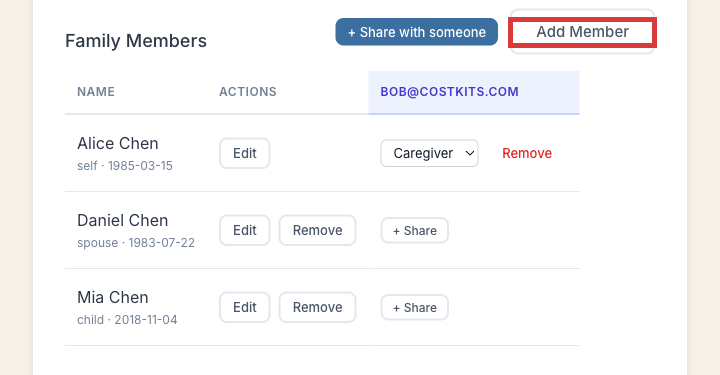
You can add as many as you need, at no extra cost. They'll show up as a selectable person everywhere in CostKits from then on.
Set up more than one caregiver later? You can add other email addresses as additional caregivers on the account whenever you'd like.
Same form everyone uses. Just set "Family member" to them instead of yourself.
More on organizing their paperworkNot sure? Any of these work. You're never locked into one path, and everything above is reachable from inside the app afterward.
How bills get grouped
Every bill you add to a visit shows the same four numbers, side by side: what the provider billed, what your insurance allowed, what insurance paid, and what you actually owe. When a visit has multiple providers (a surgeon, a facility, an anesthesiologist), you see all of them under that one visit instead of piecing it together from separate statements.
If CostKits' engine flags something, like a duplicate charge or a coding error, it shows up as an estimated savings figure right on the bill, like the disputed line above.
How paperwork gets organized
You don't have to sort documents by hand as they come in. Forward anything to your CostKits email-in address, or upload it from your phone, and it sits in one place until you (or "Organize automatically") match it to the visit it belongs to.
This is not fully automatic yet. You may need to confirm a match, but it's built to get better at this over time, and it's already faster than sorting through email and mail separately.
Common questions
Is my information secure?
Yes. Your visits, bills, and any documents you upload are private to your account. CostKits doesn't sell your data.
Do I need a credit card to try it?
No. You can sign up and start adding visits for free, no card required.
What if I only have one bill, not ongoing care?
That's fine. Add just that one visit. CostKits works whether you're tracking a single procedure or managing care over months.
Does it automatically match my bills to my insurance EOB?
On a free account, you attach documents to the visit yourself. It's simple and it works, but it's manual: you decide what goes where. Premium adds automatic matching, so bills and EOBs get sorted and paired up for you.
What if I need more help?
Every account can browse help here on the site and inside the app. Premium also includes an AI-assisted chat that's aware of your own visits and documents, so it can answer specific questions about your account, not just general ones. It only sees your own data, kept private to your account.
What if I want to stop paying, or stop using it?
If you're on Premium, you can cancel any time and drop to a free account. Your visits, bills, and documents stay right where you left them. If you'd rather leave entirely, you can delete your account and everything in it, permanently, from your account settings.
What CostKits doesn't do
CostKits isn't an insurance company and doesn't replace your plan's own coverage decisions. It's not a bill-negotiation service by itself. It's built to help you see and organize what's happening with your healthcare costs, so you can act on it with a clearer picture.
Start free. No credit card required.