
Account: your profile, family, and plan.
Manage your own details, add family members you're caring for, and handle billing, all from one place.
How it works
Add family members
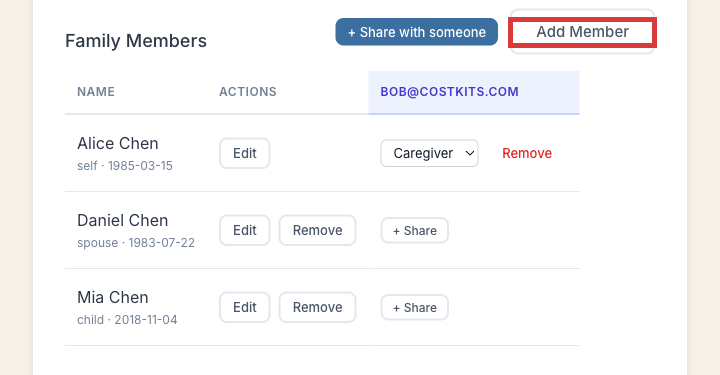
Add as many as you need, at no extra cost. Each one becomes a selectable person for visits, bills, and documents.
Manage your plan
See your current plan, upgrade to Premium, or cancel any time. Cancelling drops you to a free account; nothing is deleted.
Free vs. Premium
Free covers the full self-service loop: unlimited visits, unlimited bills (including for family members), and a limited number of stored documents. Premium adds automatic document matching, unlimited document storage, full bill-analysis findings, and an AI-assisted chat aware of your own account.
Common questions
How do I add someone I'm caring for?
From the Account page, use "Add Member." They don't need their own signup, and you can add as many as you need.
How do I cancel or change my plan?
Your Account page shows your current plan with options to upgrade or manage your subscription directly.
What happens to my data if I cancel Premium?
Nothing is deleted. Your visits, bills, and documents stay exactly where you left them on the free plan.
Can I delete my account entirely?
Yes, permanently, from your account settings. This is different from cancelling Premium, which just drops you to free.
Try it now
No separate signup, no credit card.