
Help · Tasks
Tasks: what to do next, in one place.
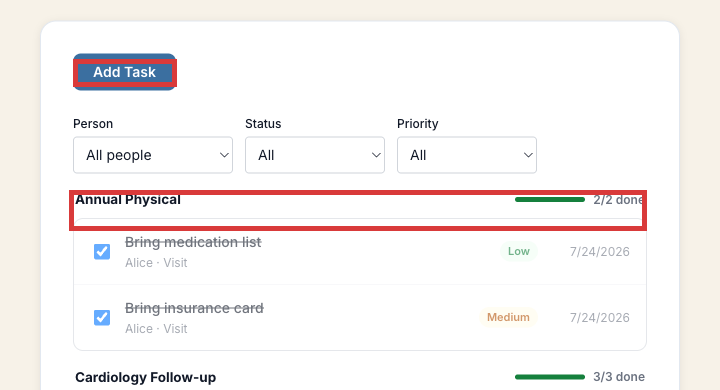
Some tasks are created for you automatically (like "bring insurance card" before a visit); others you add yourself. Either way, they're grouped by the visit or bill they belong to.
How it works
1
Tasks show up automatically
Adding a visit can generate a short prep checklist for it. You can also add your own tasks any time, for any visit or bill.
2
Filter and check things off
Filter by person, status, or priority to see what's actually due next, especially useful once you're tracking care for more than one person.
Common questions
Can I see tasks for my whole family in one list?
Yes. The Person filter lets you see everyone's tasks together or narrow down to one person at a time.
Can I add my own tasks, not just the automatic ones?
Yes. Use "Add Task" to create anything you want tracked, tied to whichever visit or bill it's about.
Try it now
No separate signup, no credit card.