
Visits: your calendar of care.
A visit is any appointment, procedure, or upcoming care event, yours or a family member's. Everything else in CostKits (bills, documents, tasks) organizes around it.
How it works
Add a visit
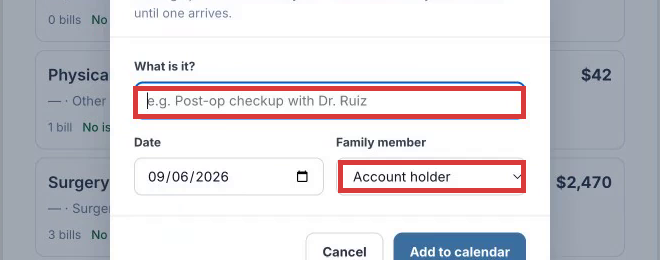
Name it, set the date, and pick who it's for. No bill needed yet. It holds the spot on your calendar until one arrives.
Attach bills as they come in
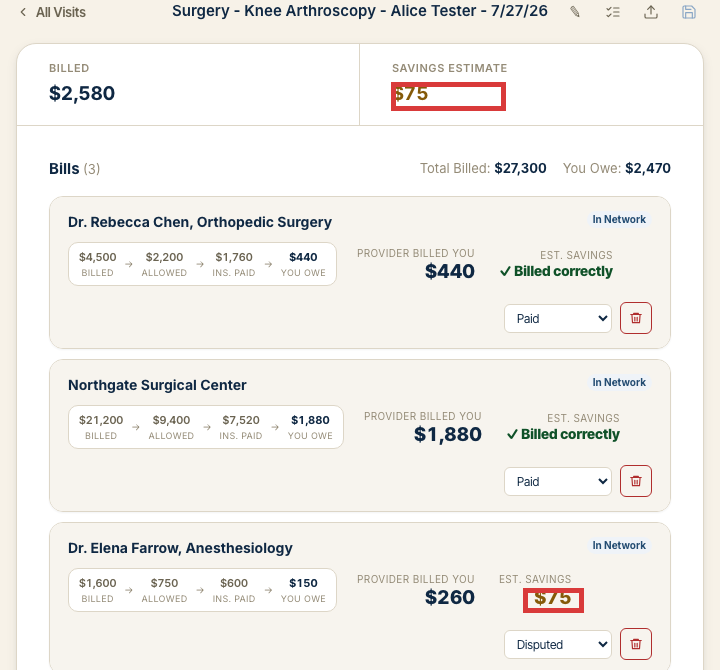
Bills from every provider tied to that visit (the facility, the physician, the anesthesiologist) show up grouped under it, not scattered across separate statements.
Common questions
Can I add a visit for someone else?
Yes. Set "Family member" to anyone already on your account, or add a new one first from the Account page. It works the same either way.
What if I don't have a bill yet?
That's the normal case for planning ahead. Add the visit now with just a name and date; attach documents whenever they arrive.
How many visits can I add?
As many as you need, on any plan. There's no cap on visits or bills for any account.
Try it now
No separate signup, no credit card.